Law Firm Website Builder (2026): The Best Pick for a Small Firm, and the Bar-Rule Pointers to Check
For a solo practice or a small law firm, the stamp goes to Wix on its Core plan, $29 a month billed annually (US price, as of 9 Oct 2026). The reason is the intake form rather than the templates: Core lifts Wix's form limits to 50 fields and 50 conditional rules (Light allows 10 and 3) and adds a signature field and paid consultation booking, which is what a careful intake flow needs. Choose it if you want practice-area pages, a consult calendar and a disciplined enquiry form in one bill. Skip it if you practise in a crowded local market and want someone else to write and rank the content for you; that is a different purchase, covered below.
One boundary before the ticket. This guide compares website builders. Where a bar rule touches the build, we name the rule and point you to it; we do not tell you what it requires in your state, because the version your state adopted, and your bar's opinions on it, are what bind you.
What a law firm site actually needs
People looking for a lawyer usually arrive with a problem that has a date attached: a hearing, a deadline, a letter they do not understand. They want to know three things fast: whether you handle this kind of matter, whether you practise where they are, and how to talk to someone. Everything on a small firm's site should serve one of those questions, which gives a short build list.
- Practice-area pages that describe the matters you take, in the words a client would use, with the jurisdictions you are admitted in.
- Lawyer bios with admissions, education and the work each person actually does.
- A contact route that protects you: an intake form built to avoid collecting the story before you have cleared conflicts.
- A consultation calendar, with a fee if you charge for first meetings.
- Plain-language notices: no attorney-client relationship from using the site, general information is not advice.
A blog, client portal, live chat and video library can come later, and the portal in particular belongs to your practice-management software rather than your website. Each trade on our board gets this same test of needs first, plan second, and the scoring method is set out in how we rank.
Intake forms and confidentiality: the disclaimer pattern
Here is the website risk most builder roundups skip. Under ABA Model Rule 1.18, someone who consults a lawyer about possibly hiring them becomes a prospective client, and the lawyer owes that person duties about what they shared. ABA Formal Opinion 10-457, "Lawyer Websites" (August 2010), considered when a website enquiry counts. Published summaries of the opinion agree on the core: a site that specifically invites people to submit details of a possible matter can create that relationship when someone does, while a page that simply lists your phone number and address does not.
The same summaries describe the opinion's answer: warnings that make clear, before anything is sent, that submitting the form does not create a client relationship, that the information may not be kept confidential, that nothing on the site is legal advice, and that the firm is not barred from acting for someone on the other side. Read the opinion itself and your own state's version of Rule 1.18 before you copy anyone's wording, including the pattern below, which is a layout rather than a form of words.
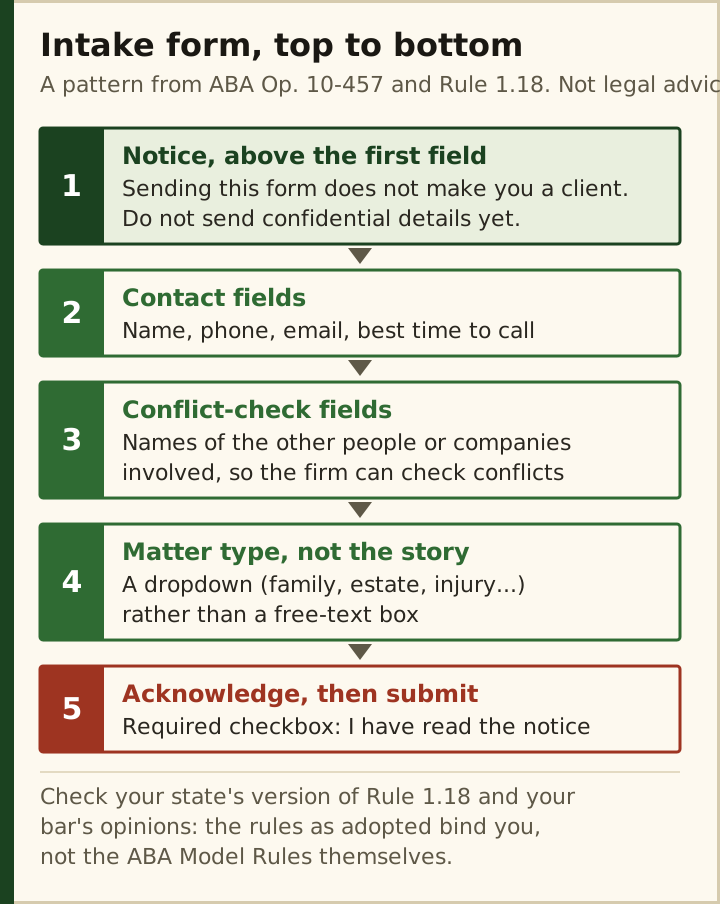
Two build details make that layout work on a general builder. First, the conflict-check fields come before any description of the matter, and the description itself is a dropdown of matter types rather than an open box inviting the whole story. Second, the acknowledgement is a required checkbox that sits after the notice and before the submit button, so nobody can send the form without passing it. Wix Light allows only 10 fields per form, which is tight once names, contact details, opposing parties and the acknowledgement are in. Core allows 50 fields with conditional logic, so the form can ask different conflict questions for a family matter than for a business dispute. That is the practical reason the stamp sits on Wix Core rather than Light.
Advertising rules: what to check with your state bar
A law firm website is lawyer advertising, and the ABA Model Rules cover it in Rules 7.1 to 7.3: 7.1 bars false or misleading communications about a lawyer's services, 7.2 sets specific rules for advertising, and 7.3 deals with soliciting clients. Every state adopts its own version, some with extra filing or labelling requirements, so the pointers below are a checklist of where to look, not a statement of what applies to you.
- Results and testimonials. Case outcomes and client quotes are where misleading-communication problems usually start. Check how your state treats them and whether it requires a disclaimer next to them.
- "Specialist" and "expert". Claims of specialisation are restricted under the Model Rules; use the words only if your state allows them for your certification.
- Naming clients. Opinion 10-457 also notes that publishing client names or matters needs the client's informed consent, because that information is confidential.
- Stale pages. A bio for a lawyer who has left, or a practice area you have dropped, can mislead. Put a review date in your calendar.
- Your bar's own guidance. Many state bars publish advertising opinions or run a review service; read them before launch.
None of this varies by website builder. What varies is how easy the builder makes it to keep pages current, which is one more reason to choose a platform you, rather than an agency's ticket queue, can edit in five minutes.
Consultation booking and payments (and the trust-account caution)
Booking is where general builders genuinely save a small firm money. On Wix, Bookings handles consultation slots and paid sessions once the site is on a premium plan that accepts payments; Core, at $29 a month annual, is the first tier that does. On Squarespace, booking is not part of the website plan, so firms add Acuity Scheduling, which Squarespace owns. Acuity's US pricing page, read on 10 Oct 2026, lists Starter at $16 a month billed annually ($20 monthly) with one calendar, Standard at $27 ($34) with up to six calendars, and Premium at $49 ($61) with up to 36, each with a 7-day trial. Every Acuity tier includes custom client forms, which can carry your terms and an acknowledgement before a slot is confirmed.
The caution is about money that is not yet yours. In most states, advance fees and retainers must go into a client trust account, and the safekeeping rules (Model Rule 1.15 as your state adopted it) govern how card fees and refunds touch that account. A website checkout pays into whatever account the builder's payment processor is linked to, normally your operating account. Use the site for a fixed consultation fee if your state allows it, and take retainers through a payment service your bar or trust-accounting software supports. Ask before you switch anything on.
The picks: Wix, Squarespace, Hostinger, and when a legal platform is worth it
Wix Core: the default for solo lawyers and small firms
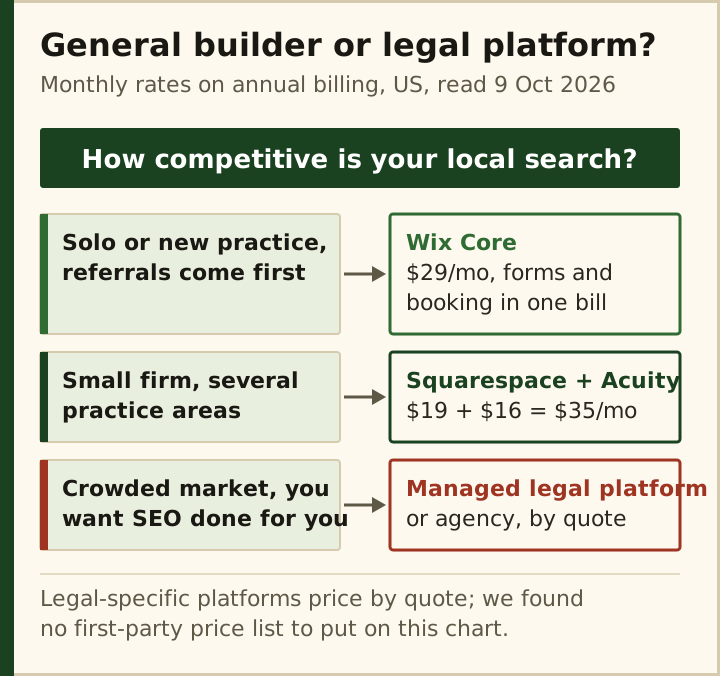
Forms, booking and payment for a consultation fee sit on one plan at $29 a month annual, $348 for the year. For a referral-led practice, where the website's job is to confirm what a referrer already said and make the first call easy, that is the whole requirement. This is the stamped pick.
Squarespace with Acuity: the design-led firm
A firm whose brand rests on presentation, with several practice areas and lawyers who want polished bios, gets better-looking templates on Squarespace, from $19 a month annual on Basic or $29 on Core. Add Acuity Starter at $16 and the pair costs $35 a month; once a second lawyer needs a bookable calendar, Acuity Standard at $27 takes it to $46. Pay Squarespace yearly and the first year of a domain is free; its domains also carry WHOIS privacy at no charge. If design is the deciding factor, Squarespace is the stronger canvas for the money.
Hostinger: the cheapest credible brochure
Premium works out to $2.99 a month, but only as a $143.52 payment covering 48 months; it then renews at $10.99 and covers up to three sites; Unlimited is $3.99 ($191.52 up front), renewing at $16.99, and is the first tier with ecommerce, which online payments need. For a lawyer who takes every enquiry by phone and wants a credible page with practice areas and a map, Hostinger is the lowest bill on this page, provided the four-year commitment and the renewal rate are acceptable.
Managed legal platforms: when someone else should do the work
Legal-specific website platforms and agencies sell content, SEO and upkeep with the site. We only print prices a vendor publishes, and the one we checked, LawLytics, puts pricing behind a demo on its own page (read 10 Oct 2026). In a crowded personal-injury or criminal-defence market, where ranking is the whole game, paying for that labour can be rational. For a referral practice it is usually a large bill for a job a $29 plan already does.
What it really costs per month
| The job | What it needs | Cheapest route | Monthly price |
|---|---|---|---|
| Practice areas, bios, phone and map | A basic paid plan | Hostinger Premium, or Wix Light | $2.99 (48-month prepay, renews $10.99), or $17 annual |
| Intake form with conflict fields and a required acknowledgement | More than 10 fields and 3 conditions | Wix Core | $29 annual |
| Consultation booking | Scheduling with client forms | Wix Core, or Squarespace Basic + Acuity Starter | $29, or $19 + $16 = $35 annual |
| Paid first consultation | Online payments | Wix Core, or Acuity on any tier | Included in the above |
| Second lawyer's calendar | More than one calendar | Acuity Standard | $27 annual ($46 with Squarespace Basic) |
| Content and SEO done for you | A managed legal platform or agency | LawLytics and similar | Not published (demo or quote) |
Two notes on reading that table. Every Wix and Squarespace figure is the annual-billing rate, charged as a lump sum, so a firm on Wix Core pays $348 at sign-up; Squarespace Basic billed monthly is $25 and Acuity Starter $20, or $45 a month together. And Hostinger's low numbers are a 48-month prepay: what matters for year five is the $10.99 or $16.99 renewal. For most small firms the realistic all-in figure is $29 to $46 a month plus a domain after the free first year, which is less than a single billable hour.
Mistakes small firms make
- A free-text "tell us what happened" box as the first field. It invites the very disclosures you cannot unsee before a conflict check.
- A disclaimer in the footer only. A notice nobody reads before pressing submit protects little; put it above the form and require an acknowledgement.
- Taking retainers through the website checkout. Builder payments land in your operating account; advance fees usually belong in trust.
- Copying another state's advertising disclaimers. Rules 7.1 to 7.3 differ by state as adopted; use your own bar's guidance.
- Leaving departed lawyers' bios live. Out-of-date pages can mislead; review the site whenever the team changes.
The same needs-first method runs across every trade we cover, from clinics to contractors, on the best website builder by industry board.
Law firm website builder FAQ
What is the best website builder for a law firm?
For solo lawyers and small firms, Wix on the Core plan at $29 a month billed annually, as of 9 Oct 2026. Core allows intake forms with up to 50 fields, conditional logic and a signature field, plus paid consultation booking on one plan. Design-led firms may prefer Squarespace with Acuity Scheduling from $35 a month.
Can I use Wix for a law firm website?
Yes. Wix is a general builder, and nothing about a law firm site needs a legal-specific platform. Light at $17 a month covers pages and a short form, but limits forms to 10 fields and takes no payments; Core at $29 adds longer intake forms and booking with payment. Keep conflict checks and trust accounting in your practice tools.
Does a law firm website need a disclaimer?
Most firms use one, and ABA Formal Opinion 10-457 discusses warnings that make clear a form submission does not create a client relationship or guarantee confidentiality. What is required depends on your state's version of the rules and its bar opinions. Place any notice above the form, before submission, not only in the footer.
How much does a law firm website cost per month?
On a builder, about $29 to $46 a month on annual billing: either Wix Core alone at $29, or Acuity Scheduling ($16 to $27) added to Squarespace Basic's $19. Hostinger starts at $2.99 a month if you prepay 48 months, then renews at $10.99. LawLytics, the legal platform we checked, publishes no price at all.
Can clients pay a retainer through my law firm website?
Be careful. A builder's checkout normally pays into your operating account, while advance fees in most states must go into a client trust account under your version of Model Rule 1.15. Use the website for a fixed consultation fee if allowed, and take retainers through a payment route your bar or trust-accounting software supports.
Compare across trades on the best website builders by industry board, or see how we rank.